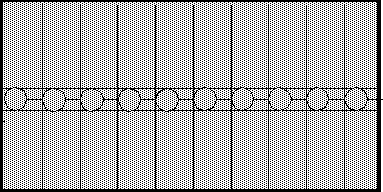
Smaller Circles
The circles are not side-by-side, and since their left side is touching the left edge of the lines that divide the drawing into 10 regions, the row of circles is shifted left a bit. Here is the modified applet:
import java.applet.Applet;
import java.awt.*;

// Assume that the drawing area is 300 by 150.
// Draw ten red circles  across the drawing area.
public class tenSmallCircles extends Applet
{
  final int width = 300, height = 150;

  public void paint ( Graphics gr )
  {
    gr.setColor( Color.red );
    int radius = 10;
    int Y      = height/2 - radius; // the top edge of the squares

    int count =  0 ;
    while (  count < 10  )
    {
      int X      = count*(width/10);  // the left edge of each of 10
                                      // rectangles across the area
      gr.drawOval( X, Y, 2*radius, 2*radius );
      count = count + 1;
    }
  }
}
And here is the pretty picture that it draws on your screen:
Here is a picture of the situation with the "guide lines" drawn in: