CS1109 Lab 15
Put the work for this lab into a new folder
public_html\cs1109\lab15.
Part 1: Don't foul your own nest
In a file called nested.php, write a PHP script that
uses nested for-loops to output each of the following:
Square
1 2 3 4 5
1 2 3 4 5
1 2 3 4 5
1 2 3 4 5
1 2 3 4 5
Triangle 1
1
1 2
1 2 3
1 2 3 4
1 2 3 4 5
Triangle 2
1 2 3 4 5
2 3 4 5
3 4 5
4 5
5
Part 2: Funny farm
Take a copy of farm.html; do not modify it.
It displays a form which offers checkboxes so the user can select which
animals Old Macdonald has on his farm.
Write farm.php, which outputs the
lyrics of
Old Macdonald Had a Farm. Here's a reminder, where we assume that the
user selects duck, cow and pig:
Old Macdonald had a farm ee-eye, ee-eye-oh.
And on that farm he had a duck ee-eye, ee-eye-oh.
With a quack, quack here and a quack, quack there.
Here a quack, there a quack, everywhere a quack, quack.
Old MacDonald had a farm, ee-eye, ee-eye-oh.

Old MacDonald had a farm ee-eye, ee-eye-oh.
And on that farm he had a cow ee-eye, ee-eye-oh.
With a moo, moo here and a moo, moo there.
Here a moo, there a moo, everywhere a moo, moo.
With a quack, quack here and a quack, quack there.
Here a quack, there a quack, everywhere a quack, quack.
Old MacDonald had a farm ee-eye, ee-eye-oh.

Old MacDonald had a farm ee-eye, ee-eye-oh.
And on that farm he had a pig ee-eye, ee-eye-oh.
With a oink, oink here and a oink, oink there.
Here a oink, there a oink, everywhere a oink, oink.
With a moo, moo here and a moo, moo there.
Here a moo, there a moo, everywhere a moo, moo.
With a quack, quack here and a quack, quack there.
Here a quack, there a quack, everywhere a quack, quack.
Old MacDonald had a farm ee-eye, ee-eye-oh.
Some notes:
- As well as the array of user selections, create an associative
array of animals and their noises (e.g. duck goes quack).
- You will need a nested loop. Each verse introduces the
next animal, but the noises of all the previously introduced
animals are repeated — in reverse order!
- It may be better to use
for-loops, rather than
foreach-loops.
- Extra optional bit. It shouldn't say "a oink";
it should
say "an oink". Fix it.
Part 3: Draughtsmanship
Take a copy of chess.html;
do not modify it:
The user can enter a number, n, into the form.
In a file called chess.php, write PHP that:
takes the user's input; validates it (check that it is
an integer between 1 and 12 inclusive); and uses
for-loops
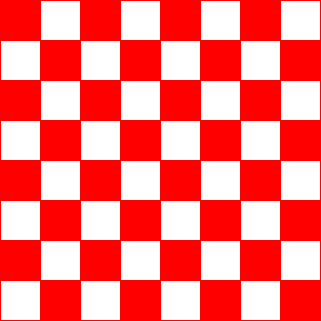
to output a PNG image of
an n by n chessboard.
Each cell in your chessboard should have sides that are 40 pixels long.
For example, this is the output in the case where n
is 8:
If there are errors in the user's input, output a PNG image
that contains an error message, like this:

For drawing, you will need three functions:
Deadline: 1pm, Tuesday 19th February.
If you have named your files and folders correctly, your work will be collected
automatically at that time by my software.
Challenge exercise: An Akiyoshi Illusion
Remember that challenge exercises are always optional. They do not form
part of your year's work and they are not worth any marks.
They are designed for those students who finish the main exercise quickly
and easily, and wish to explore further.
Similar to above, the user enters a positive integer (which must be an odd
number), call it n, into this
form: bulge.html.
In a file called bulge.php, write PHP that outputs a seemingly
bulging n by n chessboard, like the first image on
this page of Akiyoshi's Illusions.